
Start your EVOTECH request in under a minute.

Door Intercom Installation Sugar Land TX
Professional, reliable installation for homes and businesses across Katy, Houston, and the surrounding areas — clean workmanship, clear communication, and a fast, free quote.
Why customers choose EVOTECH IT LLC
Customers are not only looking for a company name. They are looking for proof that the company can perform the exact work, is truly local, has real examples, and understands the technical details.
- Exactly what we do: Door Intercom Installation Sugar Land TX — installed properly, tested, and done right.
- Local relevance: service area includes Katy, Houston, Sugar Land, Cypress, Richmond, Fulshear, Brookshire, and West Houston.
- Proof of work: real project photos, documented installations, and verifiable local reviews.
- Professional depth: testing, documentation, programming, calibration, and warranty-quality workmanship where it applies.
- Easy to reach: a clear phone number, quote form, and a real local business you can verify.
EVOTECH position
“Katy/Houston expert for low-voltage, network cabling, access control, cameras, AV, and business technology installation.”
Professional, insured, and business-ready installation standards
Clean workmanship, labeled installation, and final testing on applicable systems
Real project photos and visual proof
Recent EVOTECH IT LLC installations from around the Katy and Houston area.
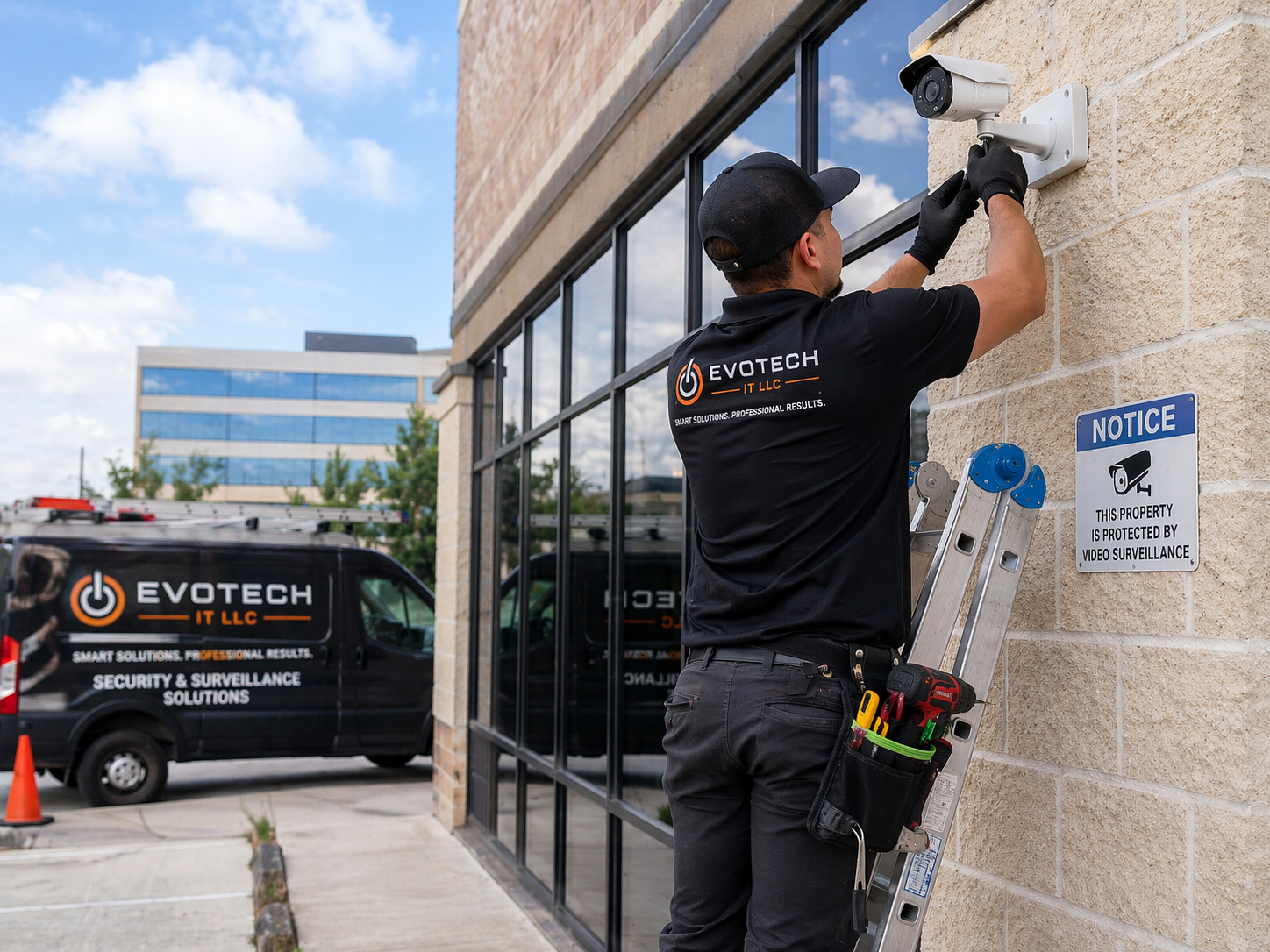

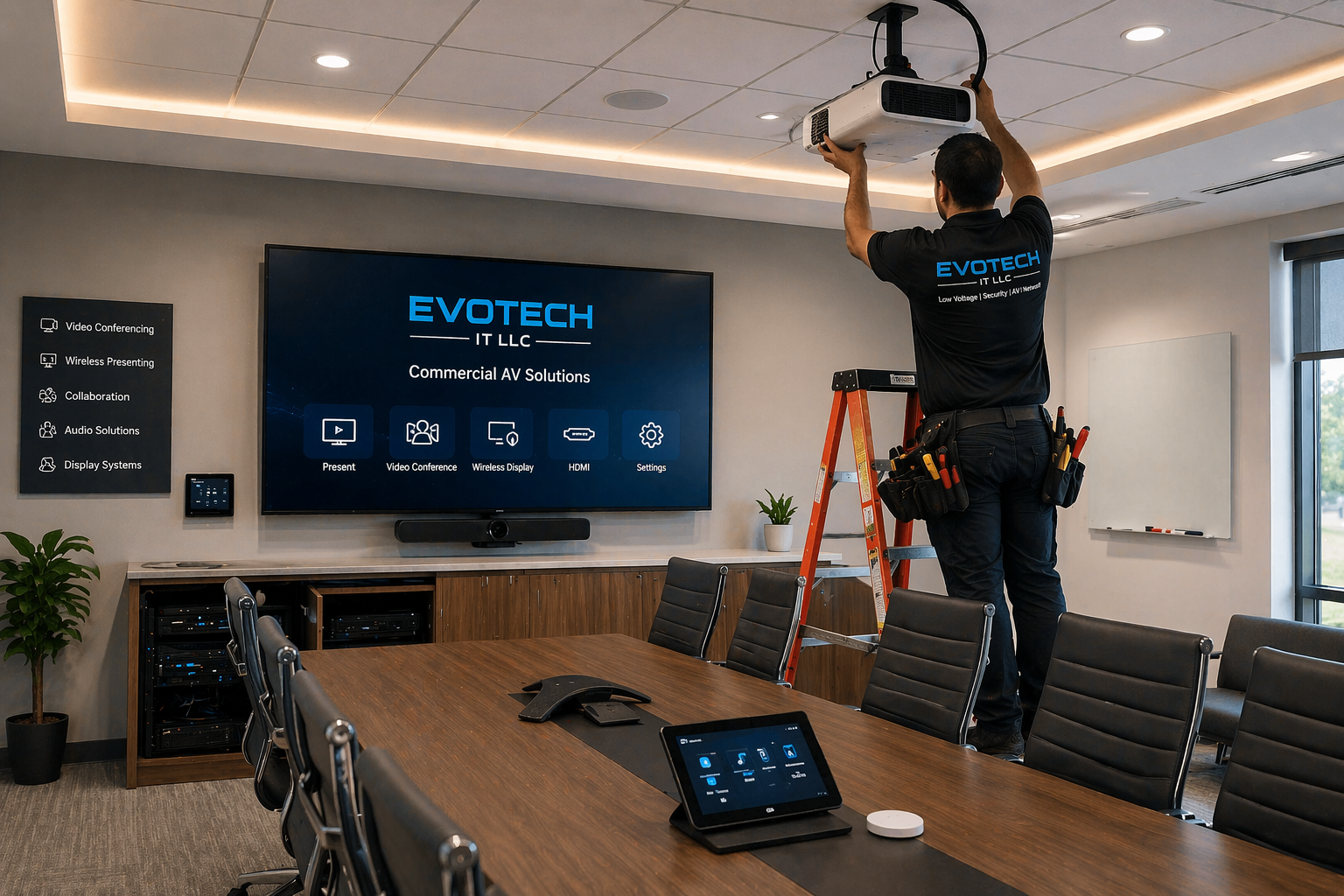

Professional scope for access control
- Card readers, keypad entry, mobile credentials, and controller setup
- Electric strike, maglock, request-to-exit, and power supply coordination
- Door hardware, low-voltage wiring, programming, and final testing
- Integration path for cameras, intercoms, alarms, and business security workflows
Core EVOTECH services
- Business communication systems
- Business phone systems
- Business phone installation
- Business phone system setup
- Business phone installer
- Office phone systems
- Office phone installation
- Commercial phone systems
- Commercial phone installation
- Small business phone systems
- VoIP phone systems
- VoIP phone installation
- VoIP phone setup
- Business VoIP installation
- Business VoIP setup
- Office VoIP systems
- Office VoIP installation
- Commercial VoIP systems
- Hosted VoIP systems
- Hosted phone systems
- Cloud phone systems
- Cloud phone installation
- Cloud phone setup
- Cloud business phone systems
- Cloud PBX setup
- Hosted PBX setup
- PBX phone system setup
- PBX installation
- SIP phone installation
- SIP phone setup
- IP phone installation
- IP phone setup
- Desk phone installation
- Desk phone setup
- Office desk phone installation
- Business phone cabling
- Office phone cabling
- Phone data cabling
- VoIP network cabling
- IP phone cabling
- Business phone wiring
- Office phone wiring
- Phone system wiring
- Phone jack installation
- Phone line installation
- Ethernet phone wiring
- Cat6 phone cabling
- Phone network setup
- VoIP network readiness check
- Router phone connection
- Switch phone connection
- PoE phone setup
- PoE switch setup for phones
- Phone extension setup
- Phone extension programming
- Employee phone setup
- Reception phone setup
- Front desk phone setup
- Manager phone setup
- Shared line setup
- Department phone setup
- Ring group setup
- Call queue setup
- Call flow setup
- Business hours call routing
- After hours call routing
- Holiday call routing
- Auto attendant setup
- Virtual receptionist setup
- IVR menu setup
- Voicemail system setup
- Business voicemail setup
- Voicemail to email setup
- Call forwarding setup
- Call transfer setup
- Call park setup
- Call pickup setup
- Caller ID setup
- Business phone number setup
- Number porting support
- New phone number setup
- Main business line setup
- Multi-location phone setup
- Remote worker phone setup
- Softphone setup
- Mobile app phone setup
- Computer phone app setup
- Headset phone setup
- Conference phone setup
- Conference room phone setup
- Paging systems
- Paging system installation
- Office paging system
- Commercial paging system
- Warehouse paging system
- Retail paging system
- Restaurant paging system
- Overhead paging installation
- Speaker paging setup
- Paging amplifier setup
- Paging zone setup
- Emergency paging coordination
- Background music and paging setup
- Intercom systems
- Business intercom systems
- Office intercom installation
- Commercial intercom installation
- Door intercom installation
- Audio intercom installation
- Video intercom installation
- Reception intercom setup
- Front desk intercom setup
- Warehouse intercom setup
- School intercom setup
- Church intercom setup
- Gate intercom coordination
- Intercom wiring
- Intercom network cabling
- Intercom speaker installation
- Door release intercom setup
- Phone system intercom integration
- Access control intercom integration
- Security camera intercom integration
- Business communication consultation
- Phone system consultation
- VoIP consultation
- Cloud phone consultation
- Phone system design
- Call flow design
- Communication system planning
- Office move phone setup
- New office phone installation
- Office buildout phone cabling
- Tenant improvement phone cabling
- Phone system upgrade
- Old phone system replacement
- Analog to VoIP upgrade
- Landline to VoIP migration
- Business phone troubleshooting
- VoIP troubleshooting
- Office phone troubleshooting
- Phone cabling troubleshooting
- Call quality troubleshooting
- Dropped call troubleshooting
- No dial tone troubleshooting
- Phone registration troubleshooting
- Phone system cleanup
- Phone system documentation
- Phone user training
- Final phone system walkthrough
What to look for when hiring an installer
Business identity
Real local service area, real phone number, real website, business email/domain, and clear company name.
Proof of work
Real photos, before-and-after examples, and a real project portfolio.
Reputation
Google reviews, recent customer feedback, and verified local business profiles.
Professional process
Testing, certification, programming, calibration, documentation, labeling, and final walkthrough when applicable.
Safety and risk
Licensed and insured, with a clear warranty, quality workmanship, and a code-aware approach.
Fast response
A clear call button, text/quote form, email, and direct contact for urgent installs.
Find & verify EVOTECH IT LLC online
These links help visitors verify the business across places where consumers commonly check before hiring a contractor, installer, or service provider.
Company trust links
Manufacturers & platforms we work with
What separates a real pro from a handyman?
- They speak in trade-specific terms and explain the installation path clearly.
- They document the scope, parts, wiring, equipment, programming, and handoff.
- They test, label, calibrate, or verify the system before calling the job complete.
- They show real proof: reviews, project photos, local listings, and direct contact information.
Questions to ask before hiring
- Do you handle the full installation or only part of it?
- Do you provide testing, certification, calibration, or final walkthrough?
- Can you show real photos of similar work?
- Do you provide an onsite quote and written scope?
Request a quote for Door Intercom Installation Sugar Land TX
Tell EVOTECH what you need installed, how many drops, doors, cameras, rooms, TVs, phones, or access points, and whether this is residential or commercial.
FAQ
What is included in a professional business phone system installation?
A professional business phone system installation includes planning, phone system design, VoIP phone setup, cloud phone setup, desk phone installation, phone cabling, network readiness review, call flow programming, extension setup, voicemail setup, auto attendant setup, ring group setup, call queue setup, business hours routing, after-hours routing, number porting support, testing, documentation, and customer training. Business communication systems are important for offices, retail stores, medical offices, dental offices, restaurants, warehouses, schools, churches, professional service firms, salons, gyms, real estate offices, law offices, accounting offices, construction companies, and any business that depends on reliable calls. A business phone installation starts with understanding how the company receives and manages calls. A small business may only need a few VoIP phones, one main business line, voicemail, and basic call forwarding. A larger office may need cloud phone systems, multiple extensions, ring groups, departments, call queues, front desk phones, manager phones, conference room phones, softphones, mobile app phone setup, and after-hours routing. A warehouse may need desk phones, paging systems, intercom systems, overhead paging, and office-to-warehouse communication. A medical or dental office may need front desk call handling, voicemail to email, call routing, and reliable desk phone setup. VoIP phone systems and cloud phone systems are common because they allow businesses to use internet-based calling instead of old traditional phone systems. A professional VoIP phone installation may include IP phone installation, SIP phone setup, desk phone setup, PoE phone setup, business VoIP setup, hosted VoIP configuration, cloud PBX setup, extension programming, business voicemail setup, call transfer setup, call forwarding setup, caller ID setup, and phone user training. The installer should make sure the phones can register correctly, make calls, receive calls, transfer calls, access voicemail, and follow the company call flow. Phone cabling is often a major part of the job. Business phone cabling, office phone cabling, phone data cabling, VoIP network cabling, IP phone cabling, Cat6 phone cabling, Ethernet phone wiring, phone jack installation, and phone system wiring help create a reliable physical foundation. Many modern VoIP phones connect through Ethernet and may use PoE from a network switch. If the cabling is old, unlabeled, damaged, or poorly routed, call quality and phone reliability can suffer. Clean cabling and proper network setup are especially important when many phones are used in one office. A professional installer should also review network readiness. VoIP phones depend on the internet connection, router, network switch, cabling, and sometimes VLAN or quality-of-service planning. Poor network conditions can cause dropped calls, choppy audio, delayed audio, one-way audio, registration problems, or phones randomly disconnecting. A VoIP network readiness check may include checking switch ports, PoE availability, cabling, router connection, internet stability, and phone registration behavior. Business phone systems must be supported by a stable network. Call flow programming is another important part of business phone system setup. A company may want calls to ring the front desk first, then roll to a ring group, then voicemail. Another company may want an auto attendant that says “press 1 for sales, press 2 for service, press 3 for billing.” A medical office may need business hours routing and after-hours voicemail. A warehouse may need calls routed to office staff during the day and forwarded after hours. A professional phone installer can set up auto attendant, virtual receptionist, IVR menu, ring groups, call queues, extension setup, department phone setup, holiday routing, call forwarding, and voicemail routing. Business voicemail setup is also important. Voicemail should be professional, easy to access, and matched to the company workflow. Some businesses need voicemail to email setup so messages are delivered to an inbox. Others need separate voicemail boxes for departments or employees. A professional business phone system installation should include voicemail testing, greeting setup, message access, and staff training. Number porting support may also be part of the process. If a business is moving from an old phone provider to a new VoIP phone system or cloud phone system, existing phone numbers may need to be transferred. Number porting must be handled carefully so the business does not lose important calls. A professional installer may help coordinate number porting, temporary numbers, call forwarding, main business line setup, and final cutover testing. Intercom systems and paging systems can also connect to business communication systems. A warehouse may need overhead paging installation. An office may need paging through desk phones. A retail store may need speaker paging. A church or school may need office paging and announcement capability. A business may also need intercom systems, door intercom installation, audio intercom installation, video intercom installation, reception intercom setup, front desk intercom setup, or phone system intercom integration. The final stage of a professional business phone installation is testing and training. Every phone should be tested for inbound calls, outbound calls, extension dialing, voicemail, call transfer, ring groups, call queues, after-hours routing, auto attendant menus, paging, intercom functions, and call quality. The customer should receive a walkthrough showing how to answer calls, transfer calls, check voicemail, use the directory, change status, use a softphone, and report problems. EVOTECH IT LLC provides business communication systems, business phone systems, VoIP phone systems, cloud phone systems, business phone installation, office phone installation, phone cabling, phone system setup, intercom systems, paging systems, phone system upgrades, and VoIP troubleshooting for businesses in Katy, Houston, Cypress, Sugar Land, Richmond, Fulshear, and surrounding areas.
What is the difference between VoIP phone systems, cloud phone systems, and traditional office phones?
VoIP phone systems, cloud phone systems, and traditional office phones all allow a business to make and receive calls, but they work in different ways and offer different levels of flexibility. A traditional office phone system often depends on older phone lines, analog wiring, or an on-site PBX. A VoIP phone system uses the internet and network cabling to carry calls. A cloud phone system is a type of VoIP solution where many phone system features are managed through a hosted platform instead of a large on-site phone server. Choosing between business phone systems depends on the company size, budget, call volume, remote work needs, office layout, internet quality, and desired features. Traditional office phones are often connected to analog phone lines or older PBX phone systems. These systems may still work, but they can be limited. Adding extensions, changing call routing, supporting remote workers, upgrading voicemail, and integrating mobile apps can be difficult or expensive. Older phone systems may also depend on outdated wiring or equipment that is harder to support. If a company has an old phone system, an analog to VoIP upgrade or old phone system replacement may improve flexibility and reduce long-term limitations. VoIP phone systems use internet protocol to send voice traffic. A VoIP phone installation usually includes IP phones, SIP phone setup, desk phone installation, phone data cabling, Ethernet phone wiring, router connection, switch connection, phone registration, and call flow setup. VoIP phones often plug into the office network using Ethernet. Many VoIP phones can receive power through PoE, which means the network cable can provide both data and power when connected to a PoE switch. This can make desk phone setup cleaner and easier to manage. Cloud phone systems are popular because many features are handled through an online platform. A cloud business phone system may include hosted PBX, cloud PBX setup, extension programming, auto attendant, voicemail to email, call forwarding, ring groups, call queues, business hours routing, after-hours routing, mobile app phone setup, softphone setup, remote worker phone setup, and multi-location phone setup. Cloud phone systems can be useful for small businesses, growing offices, professional service firms, medical offices, dental offices, real estate offices, construction offices, retail stores, and companies with remote staff. One major benefit of VoIP and cloud phone systems is flexibility. A business can often add new users, create extensions, change call routing, set up voicemail boxes, forward calls, and support mobile apps more easily than with older systems. Employees may be able to use desk phones, softphones on computers, or mobile phone apps. This helps businesses that have remote workers, multiple locations, field staff, or employees who need to answer calls away from the office. Another benefit is call flow control. With modern business phone systems, a company can set up a virtual receptionist or auto attendant. Calls can route by department, employee, business hours, after-hours schedule, holiday schedule, ring group, or call queue. A business can create professional greetings such as “press 1 for sales, press 2 for support, press 3 for billing.” This gives even a small business a more professional phone presence. Voicemail features are also better in many cloud phone systems. Business voicemail setup may include voicemail to email, department voicemail, individual voicemail, greeting setup, and remote voicemail access. This helps businesses respond faster and avoid missing customer messages. Office phone systems should make communication easier, not create hidden messages or missed calls. However, VoIP phone systems depend on network quality. A poor internet connection, bad cabling, weak router, overloaded switch, or unstable network can affect call quality. This is why business VoIP setup should include network readiness checks, VoIP cabling review, IP phone cabling, phone data cabling, PoE switch setup, and call quality testing. Common VoIP troubleshooting issues include dropped calls, choppy audio, one-way audio, phone registration problems, delayed audio, and no dial tone. A professional installer should consider the network before blaming the phone system. Traditional phone systems may be simpler in some cases, but they are less flexible for modern business communication. A company that only needs one line may not need a complex cloud phone system. But most growing businesses benefit from cloud phone systems, VoIP phone systems, extension setup, call routing, mobile app access, and easier management. Intercom and paging features can exist in both older and newer systems, but modern VoIP phone systems often provide better integration. A business may need office paging systems, warehouse paging systems, overhead paging installation, speaker paging setup, intercom systems, office intercom installation, door intercom installation, or phone system intercom integration. These features can support warehouses, schools, churches, offices, retail stores, restaurants, and commercial spaces. The best choice depends on the business. A small office may need hosted VoIP with three desk phones and voicemail to email. A warehouse may need business phone installation plus paging systems and intercoms. A medical office may need call queues, front desk phones, after-hours routing, and voicemail. A growing company may need cloud phone systems, remote worker phone setup, and multi-location phone setup. EVOTECH IT LLC provides business phone systems, VoIP phone installation, cloud phone system setup, IP phone installation, SIP phone setup, desk phone installation, phone cabling, business phone wiring, analog to VoIP upgrades, phone system troubleshooting, intercom systems, and paging system installation. A professional installer helps businesses choose the right phone platform, connect the hardware, program the call flow, test the system, and train the users.
Why are intercom systems and paging systems important for business communication?
Intercom systems and paging systems are important for business communication because they help staff communicate quickly across a building, office, warehouse, school, church, retail store, restaurant, medical office, gym, salon, or commercial property. Business communication systems are not only about phone calls. A complete system may include business phone systems, VoIP phone systems, cloud phone systems, intercom systems, paging systems, overhead paging installation, office paging systems, warehouse paging systems, door intercom installation, video intercom installation, audio intercom installation, and phone system intercom integration. A paging system allows announcements to be heard in specific areas or across an entire building. Office paging systems can be used to call staff, announce visitors, send reminders, or communicate urgent information. Warehouse paging systems can help reach employees who are away from desks. Retail paging systems can call team members to registers, stock rooms, or customer areas. Restaurant paging systems can support kitchen communication, manager calls, or customer flow. Church paging systems, school paging systems, gym paging systems, and commercial paging systems can support announcements and coordination. Overhead paging installation may include speakers, paging amplifier setup, paging zone setup, wiring, phone system integration, microphone input, and testing. Some paging systems connect with VoIP phone systems or business phone systems so employees can make an announcement by dialing a paging extension. Other paging systems use dedicated microphones or controllers. A professional paging system installation should make announcements clear without being too loud or distorted. Paging zones are useful for larger properties. A business may want one paging zone for the warehouse, one for the office, one for the retail area, and one for the outside loading area. Paging zone setup allows targeted communication instead of blasting every announcement everywhere. This can improve efficiency and reduce noise. For example, a warehouse announcement may not need to interrupt the front office. A front desk page may not need to go to the entire building. Intercom systems are different from paging systems because they are often used for two-way communication. Office intercom installation can help staff communicate between rooms or departments. Door intercom installation can allow visitors to speak with the front desk before entering. Video intercom installation can allow employees to see who is at the door. Audio intercom installation may be used for simpler communication. Business intercom systems are useful for offices, schools, churches, warehouses, apartments, gates, front desks, reception areas, and controlled entrances. Door intercom systems are especially useful when combined with access control. A front desk may use a video intercom to speak with a visitor and release the door remotely. A gate intercom may allow staff to communicate with delivery drivers or visitors. Intercom systems can integrate with access control systems, door release systems, security cameras, and business phone systems. This creates a stronger communication and security setup. Phone system intercom integration can also improve office communication. Some VoIP phone systems allow desk phones to intercom each other. A manager can speak directly to a department phone. A receptionist can page a staff member. A warehouse supervisor can make an announcement through speakers. When intercom systems, paging systems, and business phone systems work together, communication becomes faster and more organized. Intercom wiring and paging wiring are important. A professional installation may require low voltage wiring, speaker wiring, intercom network cabling, phone system wiring, paging amplifier wiring, overhead speaker wiring, Cat6 cabling, power coordination, cable labeling, and final testing. Poor wiring can cause buzzing, weak sound, dropped communication, unclear audio, or system failure. Clean wiring makes the system easier to troubleshoot and expand. Paging and intercom systems also support safety. Businesses may use paging for emergency announcements, weather alerts, evacuation messages, customer notifications, or staff coordination. A warehouse may need quick announcements when a delivery arrives. A school or church may need building-wide communication. A retail store may need manager calls. A medical office may need staff notifications. While these systems do not replace life-safety systems, they can improve daily communication and operational awareness. Sound quality matters. Paging systems should be loud enough to hear but not painfully loud. Speakers should be placed to cover the right areas. A warehouse with high ceilings may need different speaker planning than a small office. A restaurant may need lower volume and better speaker balance. A retail store may need paging plus background music. A church or school may need multiple zones. A professional installer should plan speaker placement, amplifier size, volume controls, and zones based on the building. Business paging systems can also work with background music systems. Some retail stores, restaurants, salons, gyms, and waiting rooms need background music and paging together. Background music and paging setup allows music to play normally while announcements override the music when needed. This creates a professional customer experience. EVOTECH IT LLC provides intercom systems, business intercom systems, office intercom installation, commercial intercom installation, door intercom installation, audio intercom installation, video intercom installation, reception intercom setup, front desk intercom setup, paging systems, paging system installation, office paging systems, warehouse paging systems, retail paging systems, restaurant paging systems, overhead paging installation, paging amplifier setup, paging zone setup, and phone system intercom integration. For businesses in Katy, Houston, Cypress, Sugar Land, Richmond, Fulshear, and surrounding areas, intercom systems and paging systems can improve staff communication, visitor control, customer service, safety communication, and daily operations. A professional installer helps choose the right speakers, wiring, phone integration, intercom hardware, and paging design so the system works clearly and reliably.
What should I ask before hiring a business phone system installer?
Before hiring a business phone system installer, VoIP phone installer, cloud phone installer, office phone installer, intercom installer, paging system installer, or business communication systems provider, you should ask questions that show whether the company understands phone hardware, call flow, VoIP networking, phone cabling, cloud phone setup, extensions, voicemail, number porting, intercom systems, paging systems, and final user training. A business phone system is not just a few desk phones. It controls how customers reach the company, how employees communicate, how calls route, and how professional the business sounds. The first question is whether the installer handles the exact phone system you need. Some businesses need basic business phone installation with two or three desk phones. Others need VoIP phone systems, cloud phone systems, hosted PBX, cloud PBX setup, PBX installation, SIP phone setup, IP phone installation, softphone setup, mobile app phone setup, conference phone setup, remote worker phone setup, or multi-location phone setup. A professional business phone installer should explain which system fits the office and why. The second question is whether the installer reviews your call flow. Call flow design is one of the most important parts of business phone setup. Ask how incoming calls will be answered, where calls ring first, what happens if nobody answers, how voicemail works, how after-hours calls route, and whether departments need separate options. A professional installer should understand auto attendant setup, virtual receptionist setup, IVR menu setup, ring group setup, call queue setup, extension setup, business hours call routing, after-hours call routing, holiday call routing, call forwarding, call transfer, and voicemail to email. The third question is whether number porting is included or supported. If your business already has a phone number, you may need number porting support to move the number to a new provider or phone system. Poor number porting planning can cause missed calls. Ask whether temporary numbers, forwarding, cutover timing, and final inbound call testing are part of the process. Main business line setup and business phone number setup should be handled carefully. The fourth question is whether phone cabling is included. Many VoIP phones use Ethernet cabling and may need PoE from a network switch. Business phone cabling, office phone cabling, phone data cabling, VoIP network cabling, IP phone cabling, Cat6 phone cabling, phone jack installation, phone line installation, phone system wiring, and clean cable management may be needed. If the installer only programs phones but does not handle cabling, the office may still have weak infrastructure. The fifth question is whether the network is ready for VoIP. VoIP phone systems depend on the internet connection, router, switch, cabling, and phone registration. Ask whether the installer checks call quality, phone registration, PoE switch setup, router phone connection, switch phone connection, and network stability. VoIP troubleshooting often involves dropped calls, choppy audio, one-way audio, delayed voice, phones not registering, or no dial tone. A professional installer should know how to identify whether the issue is phone hardware, network cabling, internet service, router settings, or provider configuration. The sixth question is whether voicemail and user features are configured. Business voicemail setup, voicemail to email setup, employee phone setup, reception phone setup, front desk phone setup, manager phone setup, shared line setup, department phone setup, call park, call pickup, caller ID setup, extension programming, and phone user training are all important. Employees should know how to use the system before the installer leaves. The seventh question is whether intercom systems or paging systems are needed. Many businesses need more than phones. A warehouse may need overhead paging installation. A retail store may need paging systems. A school or church may need commercial paging systems. An office may need intercom systems. A front desk may need video intercom installation or door intercom installation. Ask whether phone system intercom integration, paging system installation, paging zone setup, speaker paging setup, and background music and paging setup are possible. The eighth question is whether the system supports future growth. A company may start with a few phones and later add employees, departments, call queues, remote workers, a second location, paging, intercoms, or conference phones. A cloud phone system or VoIP phone system should be planned for growth. Ask whether new extensions, new phones, mobile app users, softphones, and multi-location phone setup can be added later. The ninth question is whether the installer provides documentation. Phone system documentation should include extension list, main number routing, voicemail setup, provider details, device names, user notes, and basic instructions. Documentation helps with future phone system upgrades, troubleshooting, and staff changes. The tenth question is whether the company has local proof and real business identity. A phone system installer serving Katy TX, Houston TX, Cypress TX, Sugar Land TX, Richmond TX, Fulshear TX, Brookshire TX, Cinco Ranch TX, Memorial Houston TX, and Energy Corridor Houston TX should show a real business name, real phone number, real website, service pages, reviews, photos, and clear communication system services. EVOTECH IT LLC provides business communication systems, business phone systems, VoIP phone systems, cloud phone systems, business phone installation, office phone installation, phone cabling, phone system setup, intercom systems, paging systems, business phone troubleshooting, VoIP troubleshooting, phone system upgrades, old phone system replacement, and analog to VoIP migration. Before hiring a business phone system installer, choose a company that can plan the call flow, install the hardware, support the cabling, test the calls, train the users, and make the system reliable for daily business communication.
Ready to make EVOTECH the obvious choice?
Katy/Houston expert for low-voltage, network cabling, access control, cameras, AV, and business technology installation.
Nearby areas & related services
Ready for EVOTECH to help?
Before you leave, send the quick version. We will review the page you came from and reply with the clean next step.